
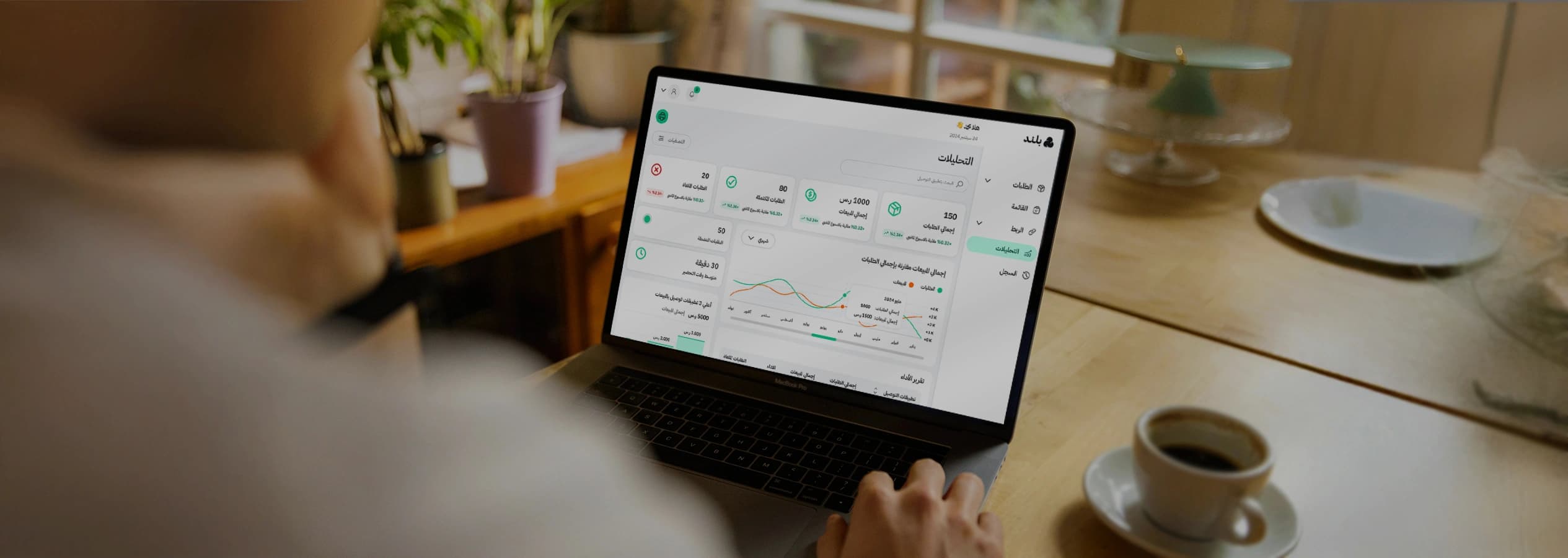
It takes 0.5 minutes (30 seconds) to manually accept each order—so 10 orders cost you 5 minutes of wasted time! Every minute counts during peak hours. But don’t worry—with Blend’s automatic order acceptance system!
You can now accept all delivery orders instantly and automatically, which positively impacts the performance of your restaurant, store, or even pharmacy!
⭐ Saves time and effort
⭐ Reduces errors and oversights
⭐ Enhances customer experience
Learn more about the automatic order acceptance feature and how it can elevate your operations and revenues. With the Blend delivery-order management platform, your time is gold!
What is the automatic order acceptance system in the delivery order management platform?
The automatic order acceptance system is a feature that enables commercial establishments—like restaurants, cafes, stores, malls, pharmacies—that use a delivery-order management platform to accept incoming orders automatically through delivery companies, without needing to manually approve each one.
This feature saves employees time and effort—especially during peak hours when every minute matters—and ensures no external orders are forgotten or left pending, reducing errors and increasing customer satisfaction.
Since Blend is the leading delivery-order management platform for stores and restaurants in Saudi Arabia, it includes the “Auto-Accept” feature that you can enable for one or all delivery companies. It simplifies your workflow and lets you organize and manage external orders—even during the busiest periods.
What are the benefits of the auto-accept feature in an order management system?
The auto-accept feature saves staff time—as orders are accepted instantly and automatically, improving customer experience. With this feature, there’s no delay or oversight. Order acceptance is ten times faster, even during peak pressure times.
Below are the main advantages of auto-accept and how they positively impact the performance of restaurants, cafes, and large stores:
1. Saves employee time
By automating order acceptance, employees no longer need to review and approve each order manually. This frees them up for more complex or human-focused tasks such as handling customer complaints or monitoring quality.
🔸A real-world example: At a restaurant offering online orders, staff used to manually review each order before confirming. After enabling auto-accept, employees focused on preparing orders instead of administrative follow-up—greatly improving productivity.
2. Speeds up operations
Auto-accept reduces the wait time between order submission and its acceptance in the system—the order is accepted immediately upon arrival, speeding up subsequent stages like preparation and delivery.
🔸A real-life example: In an online store, an order used to take 5 minutes to be manually accepted in the system. After enabling auto-accept, the order is sent to the delivery section immediately after payment, reducing processing time and speeding up delivery.
3. Reduces human error
By automating acceptance, the human factor is removed—there’s no chance of forgetting to accept or reject an order. When done manually, errors like missed orders, incomplete approvals, or incorrect data entry can occur.
🔸How does it reduce errors? In an online store, an order used to take 5 minutes to be manually accepted in the system. After enabling auto-accept, the order is sent to the delivery section immediately after payment, reducing processing time and speeding up delivery.
4. Relieves peak-time pressure
During peak times (like holidays or promotions), orders pile up quickly. Auto-accept handles each order immediately based on available stock and the order management platform’s updates, preventing backlog and balancing workloads across departments.
🔸Real-world example: During White Friday deals, a store received over 1,000 orders in one hour. Thanks to auto-accept, the system wasn’t congested and orders were prepared smoothly without needing extra staff.
5. Enhances customer experience
Auto-accept provides immediate acknowledgment to customers, making them feel valued. It improves their experience, enhances satisfaction, strengthens trust in the service, and encourages repeat purchases.
🔸Real-life example: A customer placed a meal order via a delivery app and instantly received a notification that the order was being prepared, thanks to auto-accept. It reassured them and earned praise for speed in their review.
Auto-accept feature in the Blend delivery-order management platform for restaurants and stores
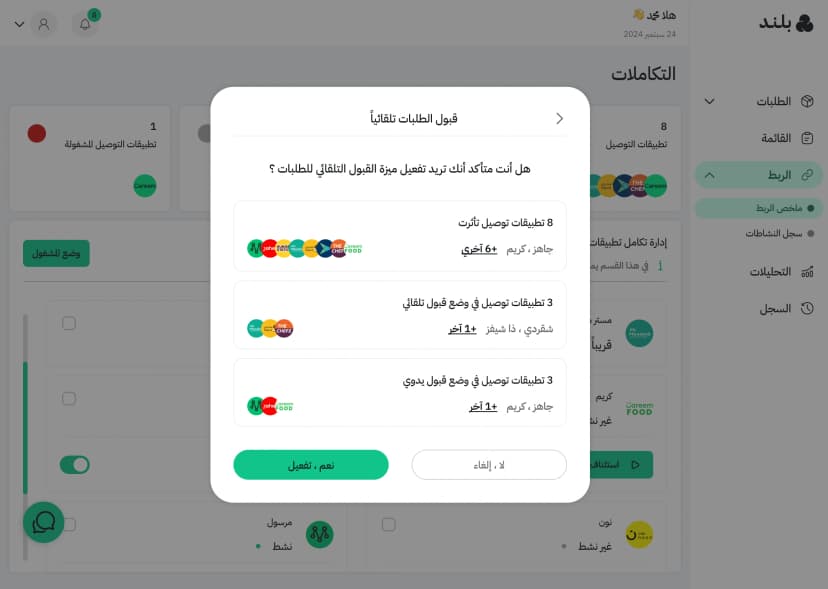
Blend’s platform offers an auto-accept feature that can be enabled for one or more connected delivery companies. For example, you can enable instant acceptance for Shaghdari and The Chefs while keeping other apps like Jahez and Careem on manual acceptance.
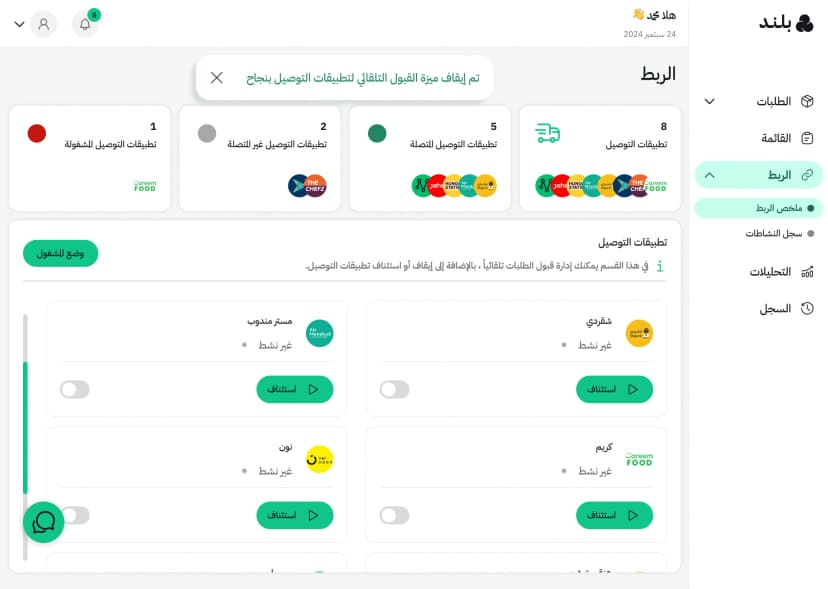
You can disable auto-accept at any time with a single click—helping you organize the flow of external orders, avoid errors from forgotten pending orders, and maintain control.
To enable auto-accept in Blend, follow these steps:
- 1- From the sidebar menu, click “Integrations”.
- 2- Then go to the “Integration Summary” from the same sidebar.
- 3- You’ll see an interface showing all connected delivery apps.
- 4- From here, you can enable auto-accept for any app or all of them.
- 5- You can also disable auto-accept to return to manual acceptance.
Organize your time, increase your profits, and focus on what truly matters!
With Blend’s auto-accept system, you won’t waste a single minute managing orders manually. Let the system work for you so you can elevate customer service and develop your business.
Whether you run a restaurant, store, pharmacy, or even a small kiosk, Blend gives you the tools you need to be more efficient and professional—especially during busy periods.
✨ What are you waiting for? Start now with Blend and activate auto-accept with ease!